
Informed Delivery Guide
Informed Delivery adds a digital impression to eligible physical mail. Subscribers can see mail previews in the USPS Daily Digest, and business mailers may add campaign images and a clickable URL.
Daily DigestRide-Along ImageRepresentative ImageHTTPS Campaign URLReporting
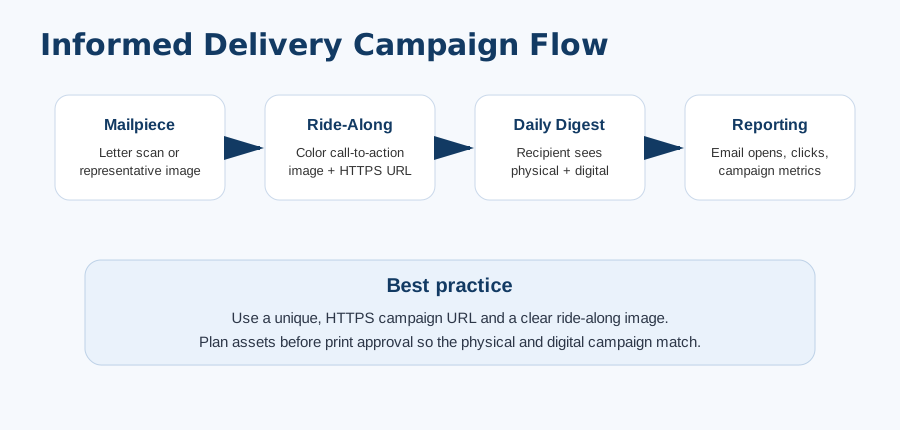
How the Customer Experience Works
USPS Daily Digest
Grayscale mailpiece preview
Ride-Along Image
Clickable Campaign URL
Clickable Campaign URL
Campaign Inputs
| Item | Purpose |
|---|---|
| Brand Display Name | Shown to the recipient in the USPS experience. |
| Campaign Title / Code | Internal reporting and campaign organization. |
| Representative Image | Full-color image used when applicable, especially for pieces not scanned like letters. |
| Ride-Along Image | Clickable call-to-action graphic displayed with the mailpiece. |
| Target URL | HTTPS landing page for response tracking. |
Data + Reporting
1
Extra digital impression
Mail can be seen physically and digitally, increasing campaign touchpoints.
2
Trackable link
Use a unique HTTPS URL with UTM parameters or campaign code to separate Informed Delivery response from other channels.
3
USPS reports
Completed campaign data may include emails generated, opens, clicks, and click-through rates when available.
4
Portal archive
Plavidian stores campaign images and report uploads in the job file record.
Campaign setup should be completed before mail induction. USPS review and campaign display are subject to USPS rules and approval.
Plavidian Checklist
Confirm eligibilityMail class, barcode, and documentation must support campaign setup.
Prepare assetsRepresentative image, ride-along image, brand name, campaign title/code.
Use HTTPS URLLanding page should be live, accurate, and trackable.
Archive reportsUpload USPS summary/detail files into the job after completion.